
How we improved our recruiting process by using AI

How we improved our recruiting process by using Generative AI
Hiring technical talent across new regions meant our team was suddenly handling dozens of applications every day. Screening them quickly — while still maintaining quality — was becoming a major bottleneck.
To solve this, we built a multi-agent system powered by Generative AI. Using LangChain and LangGraph, we orchestrated specialized LLM agents that evaluate candidates on multiple dimensions — from English proficiency to coding skills and theoretical knowledge.
The result? We cut our first-round review time by over 50%, freeing up our HR and technical team to focus on top candidates and personal interviews.
In this article, I’ll show you exactly how we designed and implemented this system.
Introduction
As part of our recruiting process, candidates go through a few exercises and theoretical questions based on the role they are applying to.
In this solution we try to enhance our review and evaluation process, by having many AI agents review the candidate from multiple points of view. Having said that, this process does not eliminate manual intervention, but is rather a tool to help reviewers complete their task quicker and more comprehensively.
Agents Overview
In order to improve the output for our agentic system, we decided to split the work between multiple agents. Additionally, it allows us to choose different LLMs depending on the task.
Agent’s diagram showing how they are connected:
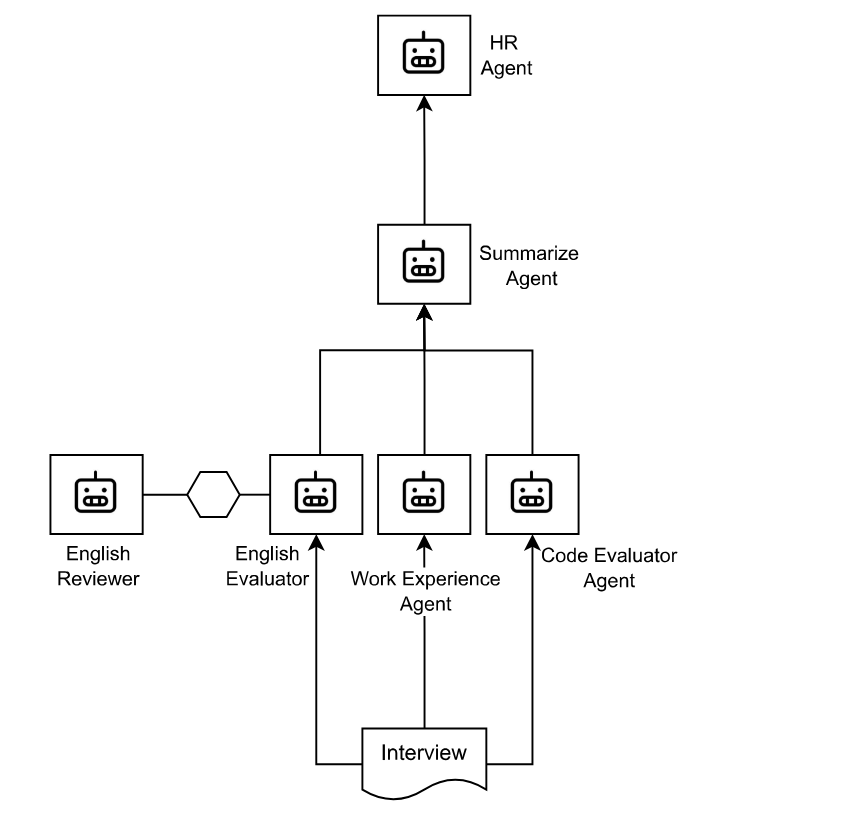
English Agent & Reviewer
Will review the English level of the candidate based on the answers (excluding code). Reviewer Agent was configured to validate the output from the English agent was accurate.
Code Reviewer Agent
Will review the code, for now we use a single agent independently of the programming language.
Theory Reviewer Agent
Will review the answers to our theoretical knowledge questions.
Work Experience Agent
For now it will summarize the working experience based on the needs for the role, but will improve in following iterations to improve matching the candidate with our open positions.
Summarizing Agent
This agent will gather the output from all the other agents and create a summary to be processed by the final agent.
This output will be published to our hiring portal.
HR Agent
This agent will grab the summary from the hiring portal and make a decision to continue with the interviews or not.
Code examples
LLM Setup
base_url = "https://api.groq.com/openai/v1"

openai_api_key = "Your_API_Key"
model = "llama-3.3-70b-versatile"

llm = ChatOpenAI(
        model=model,
        temperature=0.3,
        max_tokens=None,
        timeout=None,
        max_retries=2,
        base_url=base_url,
        api_key=openai_api_key
)
State setup
Considering for some scenarios we would like to have multiple agents working together as part of the same LangGraph Workflow, we created a custom state to store the candidate and the position they are applying to:
class InterviewState(TypedDict):
    messages: Annotated[list[BaseMessage], add_messages]
    position: str # i.e. Senior .NET Developer
    remaining_steps: int # to break conversations, prevent hallucinations
    candidate: str # for candidate record lookups
Agents setup
This is the first agent we setup, but all of them are very similar. The only one with a different approach is the HR agent, which we’ll cover later.
from langgraph.prebuilt import create_react_agent

_english_agent = create_react_agent(
    model=llm, # we use the same llm object for every agent, but they could be different
    tools=[], # not using tools yet, but could do eventually
    state_schema=InterviewState, # in the future, each workflow could have its own State
    prompt=english_agent_prompt
)
English node setup
LangGraph uses nodes to work. In this scenario each node behaves a single agent.
def english_node(state: InterviewState):
    print("Invoking English agent.....")
    global _english_agent
    response = _english_agent.invoke(state)
    print(".......... message received .....")
    return add_message(state, response["messages"][-1].content)
Reviewer node setup
This node is a little trickier, because we need to be able to reply to the English node in case we need to apply some changes to the previous output, but it may also be OK and no more changes are required. If the reviewer writes “FINAL ANSWER”, we’ll continue to the next node, which in this case means to END the workflow. This code will take care of that:
def reviewer_node(state: InterviewState) -> Command[Literal["english_expert", END]]:
    print("Invoking Reviewer agent.....")
    global _reviewer_agent
    response = _reviewer_agent.invoke(state)
    print(".......... message received .....")

    goto = "english_expert"
    if "FINAL ANSWER" in response["messages"][-1].content:
        print("............. FINAL ANSWER received .....")
        goto = END
    elif state["remaining_steps"] <= 0:
        print("............. No more steps left .....")
        goto = END


    return Command(
        update=add_message(state, response["messages"][-1].content, is_human=True),
        goto=goto,
    )
Workflow setup
checkpointer = InMemorySaver()

workflow = StateGraph(InterviewState)
workflow.set_entry_point("english_expert")
workflow.add_node("english_expert", english_node)
workflow.add_node("reviewer", reviewer_node)

workflow.add_edge("english_expert", "reviewer")
workflow.add_edge("reviewer", END)

graph = workflow.compile(checkpointer=checkpointer) # this is required, otherwise the conversation will not store old messages!

config = {"configurable": {"thread_id": thread_id}} # threads are used to separate conversations / workflows from each other. In our case, we want isolated conversations, we set a different thread_id every time.

initial_state = InterviewState(
    messages=[HumanMessage(content=theory_interview)],
    remaining_steps=7 # we don't want more than 7 messages
)

output  = graph.invoke(initial_state, config=config)
HR agent setup
Code Reviewer, Theory Reviewer and Work Experience agents are similar to the English agent, but HR agent has a different setup, because it uses ChatPromptTemplate to build the prompt.
from langchain_core.prompts import ChatPromptTemplate

prompt_template = '''
This is a prompt template, in which we need to send the position we are interviewing for: {position}

And the candidate summary: {candidate_summary}
'''

hr_agent_prompt = ChatPromptTemplate.from_template(prompt_template)
HR Workflow setup
workflow.set_entry_point("summarize_expert")
workflow.add_node("summarize_expert", summarize_node)
workflow.add_node("hr_assistant", hr_node)

workflow.add_edge("summarize_expert", "hr_assistant")
workflow.add_edge("hr_assistant", END)

graph = workflow.compile()
print('Compiled Workflow')
graph.get_graph().draw_mermaid_png(output_file_path=os.path.join('.', "output", candidate_folder, timestamp, "output.png"))

initial_state = InterviewState(
    messages=[HumanMessage(content=outputs)],
    remaining_steps=2,
    position=position,
    candidate="to be completed by summary agent"
    )

print('========= Summarize Workflow Started ========')
output  = graph.invoke(initial_state)
print('========= Summarize Workflow Finished =======')
Final thoughts
This multi-agent approach is still in its early stages, but it’s already transformed our hiring process. By automating the first layer of evaluation, we’ve accelerated our pipeline and allowed our team to spend more time on what really matters — connecting with the right candidates.
Next, we plan to expand this system to include automated scheduling and deeper skill-matching to specific roles.
If you’re working on similar problems, or have ideas to improve this even further, I’d love to hear from you. Feel free to drop a comment below!